Play Hero logoPlay Hero

Upload the AAB.
Take correct answers to Play Console.

Play Hero reads your bundle, maps permissions and SDKs to a Data Safety draft, writes your privacy policy and listing copy, and reframes your screenshots. You check everything and paste it into Play Console yourself.

Two ways to launch: use the free tools yourself and submit in Play Console, or delegate it all — we upload your app for you.

DEMOhabit-tracker.aab · 24.1 MB

com.example.habittracker · v2.4.1 (41)

minSdk 26 · targetSdk 34 · 2 SDKs fingerprinted

INTERNET
POST_NOTIFICATIONS
RECEIVE_BOOT_COMPLETED
VIBRATE
analytics-sdk → App interactions collectedmapped

Package name inferred heuristically — you confirm it in review.

Sample output from a demo bundle. Your AAB produces your own rows

Templates that make raw shots sell

Open the screenshot generator →

20 styles to choose from — a sample below. Your captures, your words — export at 1080×1920.

What you take to Play Console

Data Safety pre-fill does the heavy lifting. The rest fills the gaps around it.

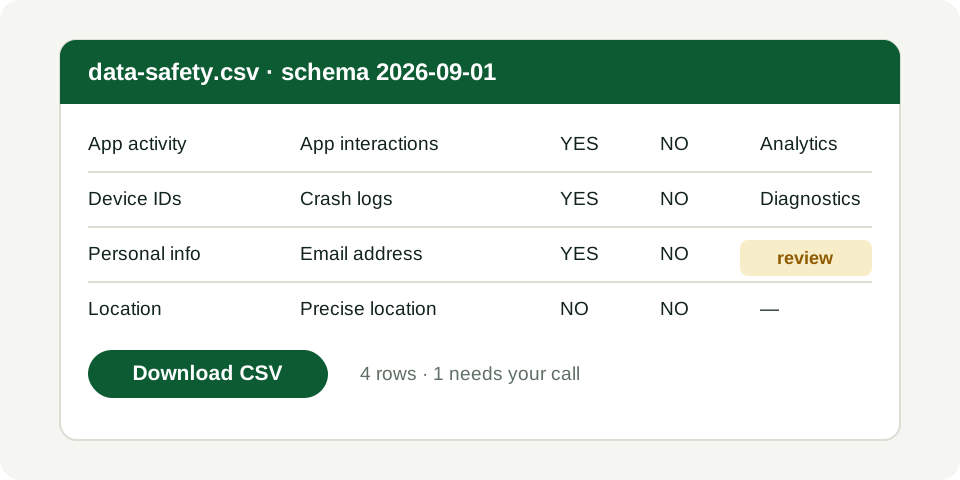
Data Safety, pre-filled row by row

Permissions and SDKs become a category-by-category profile. Anything uncertain is marked as needing your call instead of silently guessed.

export → data-safety.csv · schema 2026-09-01

Open the Data Safety generator →
Preview of a generated Data Safety CSV: 4 rows, one flagged for your call

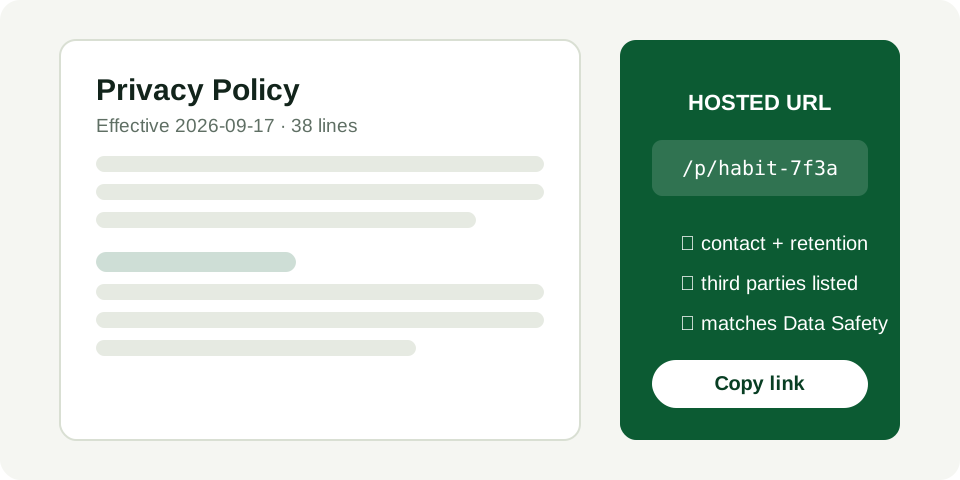
Privacy policy with a hosted URL

Drafted from your actual data profile — what you collect, why, and who to contact. Edit it, download the HTML, publish the link Play requires.

Generated privacy policy document beside its hosted URL /p/habit-7f3a

GET /p/habit-7f3a → 200 · 38 lines

Open the privacy policy generator →

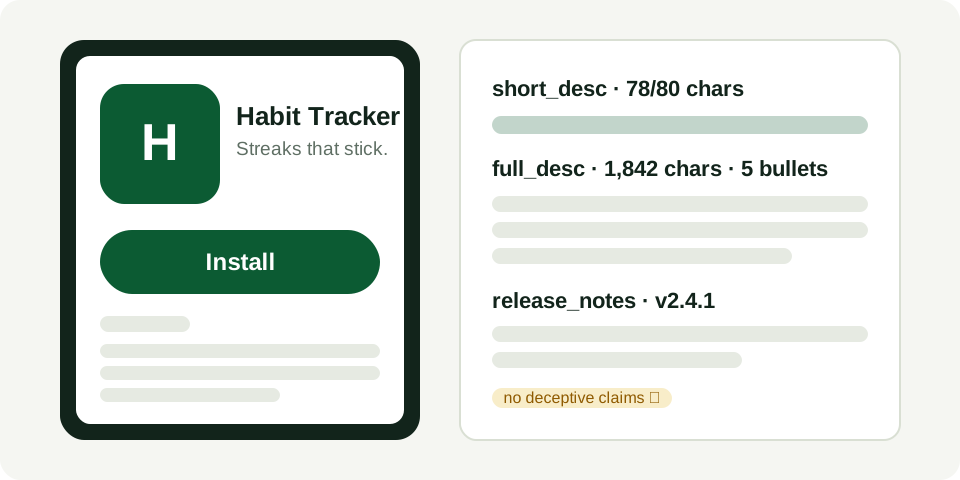
Listing copy in your voice

Short + full description, feature bullets, and release notes generated from what the app does. You cut what sounds wrong.

Draft store listing: short description, full description bullets, and release notes

short_desc 78/80 · 5 bullets · release notes drafted

Open the store listing generator →

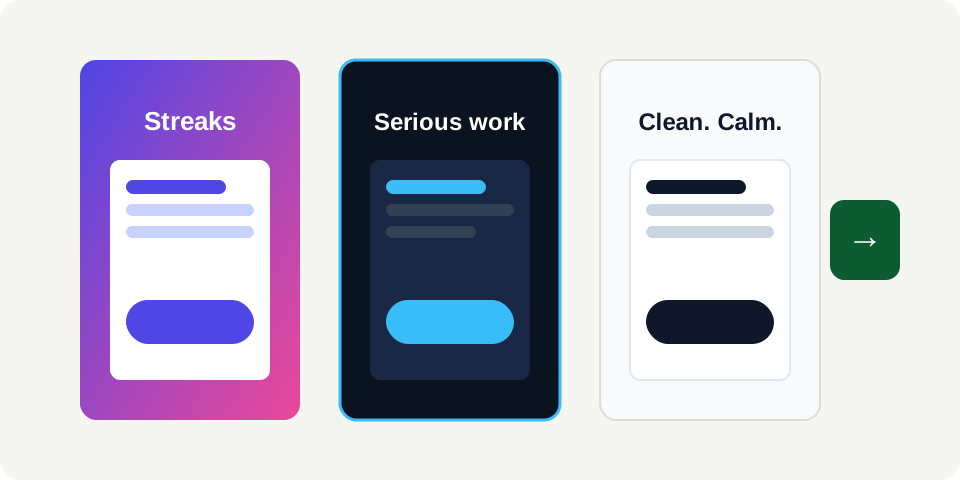
Screenshots reframed for the store

Upload raw captures, pick a template, export the sizes Play wants. No designer needed; no stock-photo filler.

Screenshot template styles applied to store captures

1080×1920 ×4 · 4 of 4 reframed

Open the screenshot generator →

Readiness ledger — what's left before you submit

Open a sample checklist →
Package + version detectedready
Target audience confirmedready
Privacy policy hostedready
Screenshots exportedready

Inspect the actual files before you sign up

Sample output from a demo bundle — yours is generated from your AAB. Download them, open them, check the format.

data-safety.csv · schema 2026-09-01

4 rows · 1 needs your call

categorydata typecollectedsharedpurposeflag
App activityApp interactionsYesNoAnalytics—
Device or other IDsCrash logsYesNoDiagnostics—
Personal infoEmail addressYesNoAccountyour call
LocationPrecise locationNoNo——

+ is_optional & evidence-notes columns in the downloaded file

privacy-policy.txt · + hosted URL

22 lines · contact + retention covered

Privacy Policy for Habit Tracker

Effective date: 2026-09-13

Habit Tracker ("we", "our") operates Habit Tracker. Contact: support@example.com.

DATA WE COLLECT

App interactions: purposes: Analytics. Collected via analytics SDK to understand feature usage.

Crash logs: purposes: Diagnostics. Collected via crash-reporting SDK to fix stability issues.

Email address: purposes: Account. Collected at sign-up for account management. Under review — confirm it is required.

DATA WE SHARE

Crash logs may be shared with our crash-reporting provider for diagnostics only.

We do not sell personal data.

RETENTION AND DELETION

Account data is kept while your account is active and deleted within 30 days of a deletion request to support@example.com.

Analytics and crash data are aggregated and retained for 12 months.

CONTACT

Questions about this policy: support@example.com.

Template assistance — review for legal suitability.

Full text + hosted URL in the download.

How it works

Four steps. The fourth one happens in Play Console — by you.

  1. 01Create a projectName the app, set target audience and contact email.ready
  2. 02Upload the AABAnalysis runs immediately: package, permissions, SDK fingerprints.ready
  3. 03Review and editAccept, correct, or flag each Data Safety row and every draft.review
  4. 04Download + submitTake the CSV, policy, copy, and images into Play Console yourself.you

safe by construction

Three guarantees

You submit. Always.

The free tools have no publish button. A tool that can submit can also misdeclare — so that power stays with you.

no publish endpoint · managed publishing is opt-in

Nothing to steal.

No passwords, no 2FA codes, no OAuth tokens. There is nowhere to phish, leak, or revoke.

no credential fields exist — ever

Uncertainty, labeled.

Heuristic guesses ship as guesses, evidence attached. A flagged row you check beats a confident row that's wrong.

every finding cites its evidence string

option 1 · use the tools and go

Bring your next AAB. Leave with a checklist.

Free to analyze and export. You submit yourself.

option 2 · delegate it all

Or let us upload it to Google Play for you

Prefer to hand it off? We handle the Play Console submission — listing, Data Safety, and review monitoring. No passwords, ever.